Technical note
Stable Core, Adaptive Surface
A technical note on adaptive interface systems, generative UI, and the architecture required to create fluid digital experiences without sacrificing trust.
How AI-enabled interfaces can adapt to user context, task complexity, accessibility needs, and workflow state while preserving trust, predictability, and control.
Most digital products still expect users to adapt to the interface. The navigation is fixed. The dashboard is fixed. The information density is fixed. The workflow assumes the same user, context, intent, and expertise level every time.
Adaptive interface systems invert that relationship. Instead of forcing every user through the same digital surface, adaptive systems adjust the interface around task, context, user behavior, accessibility needs, and workflow state. The interface becomes less like a static screen and more like a responsive operating layer.
The opportunity is significant. AI-enabled systems can personalize layouts, reorder information, simplify workflows, highlight relevant actions, shift between modes, and support users with different levels of expertise. But adaptation introduces risk. When an interface changes too much, users lose orientation. When systems personalize without explanation, users lose trust.
Key findings
Interface shift
From static screens to adaptive systems
Digital products are moving from fixed layouts toward interfaces that respond to user intent, context, task, and behavior.
Primary risk
Loss of predictability
An interface that adapts too aggressively can confuse users, disrupt muscle memory, and reduce trust.
Most effective control
Fluid experience architecture
Adaptive systems should preserve a stable core while allowing controlled transformation across layout, density, mode, content, and interaction patterns.
What adaptive interface systems are
An adaptive interface system is a digital interface that can change its structure, content, visual presentation, or interaction model based on user signals and contextual information. Those signals may include user role, task intent, experience level, device type, accessibility preferences, session behavior, workflow state, location, prior actions, and system confidence.
The important distinction is that adaptive interfaces are not just personalized content. They are systems that change the operating surface of the product.
Three levels of interface adaptation
The central design problem
Adaptive interfaces create a tension between personalization and stability. A static interface is predictable but limited. A fully adaptive interface is responsive but potentially disorienting. The design challenge is deciding what should remain fixed and what should be allowed to change.
Stable core, adaptive surface
The operating principle
- 01
Stable core
Primary navigation, critical actions, account controls, security and confirmation flows, system status, task progress, undo, recovery, and persistent user preferences should not move unpredictably.
- 02
Adaptive surface
Layout density, suggested actions, content priority, dashboard modules, guidance level, visual emphasis, workflow shortcuts, contextual explanations, and mode-based views can change based on user context.
Dimensions of adaptation
Where adaptive systems transform
- 01
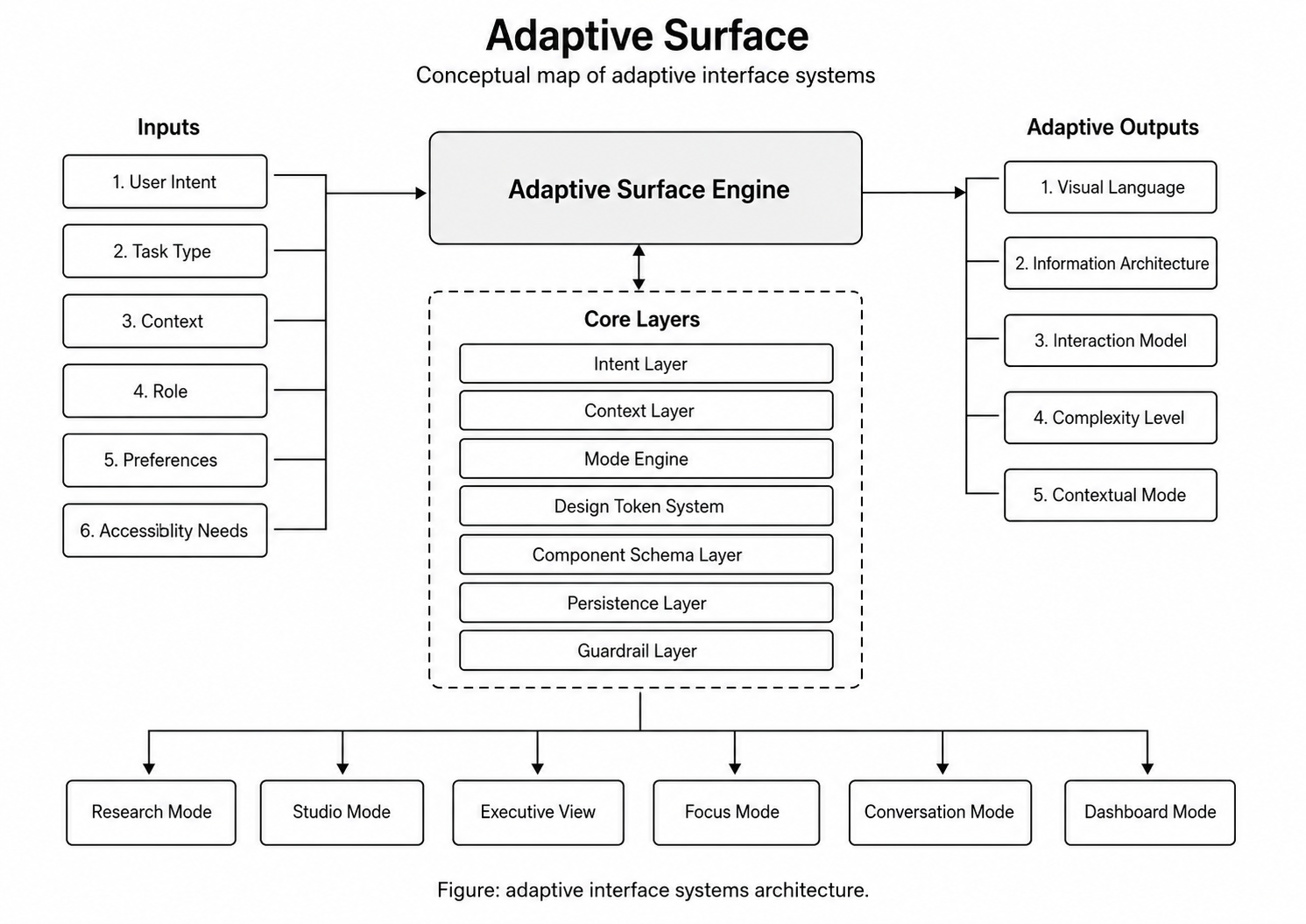
1. Information architecture
The system can prioritize, group, or reorder information based on task relevance.
- 02
2. Visual density
The interface can shift between simplified, standard, and expert views.
- 03
3. Interaction model
The interface can move between manual control, assisted control, and delegated control.
- 04
4. Contextual mode
Products can shift between focus, review, collaboration, presentation, diagnostic, and recovery modes.
- 05
5. Accessibility state
The interface can respond to contrast, spacing, motion reduction, assistive labeling, keyboard navigation, and alternate input needs.
- 06
6. Trust and confidence state
When the system is uncertain, the interface should become more transparent by showing evidence, confidence, review prompts, and fallback paths.
Why generative AI changes the interface problem
Traditional interfaces are assembled in advance. Generative AI introduces the possibility of dynamic interface assembly based on user intent, available data, business rules, task complexity, risk level, device context, user preference, and model confidence. That creates the possibility of a fluid interface, but only if the system is constrained.
A design-system grammar should define
- Approved components
- Layout rules
- Spacing rules
- Accessibility requirements
- Color and contrast constraints
- Allowed interaction patterns
- Content hierarchy rules
- Animation limits
- Error-state patterns
- Confirmation requirements
- Role-based permissions
Principles of fluid experience architecture
- 01
1. Stable core, adaptive surface
Critical navigation, status, confirmation, and recovery patterns should remain stable while supportive interface elements adapt.
- 02
2. User-controlled transformation
Users should be able to approve, reject, pause, or reverse important interface changes.
- 03
3. Progressive adaptation
The system should adapt gradually as it learns user preferences and as trust increases.
- 04
4. Mode clarity
When the interface changes modes, the user should understand what changed and why.
- 05
5. Reversibility
Users should always have a clear path back to the previous state.
- 06
6. Task-first adaptation
The interface should adapt to improve task completion, clarity, speed, accessibility, or decision quality — not merely to appear intelligent.
- 07
7. Privacy by design
Adaptive systems should minimize data collection, protect sensitive signals, and explain how personalization works.
- 08
8. Evaluation loop
Adaptation should be measured against usability, task success, accessibility, error rate, user trust, and operational outcomes.
Adaptive surface map
Where adaptive interfaces create value
- Enterprise dashboards — Adaptive dashboards can shift between executive summary, operational review, and technical diagnostic views.
- Internal tools — Interfaces can reduce clutter by surfacing the right actions for each role.
- AI workflow systems — When AI confidence changes, the interface can expose evidence, review controls, escalation paths, and fallback actions.
- Learning and onboarding — New users can receive guided experiences while advanced users unlock denser controls and faster paths.
- Accessibility-sensitive products — Interfaces can adapt to user needs without requiring every setting to be configured manually.
- Agentic systems — Interfaces can shift between direct manipulation, assisted review, and delegated execution.
The danger of over-adaptation
- The user cannot predict where controls will be.
- The interface changes without explanation.
- Personalization hides important information.
- AI-generated layouts violate accessibility standards.
- Users cannot undo adaptations.
- The system optimizes engagement instead of task success.
- Different users see different realities without governance.
Design requirements for adaptive interface systems
- User model governance — Define what user data is collected, how it is stored, and how it influences interface changes.
- Adaptation boundaries — Document what the system is allowed to change.
- User approval controls — Allow users to accept, reject, undo, or disable adaptations.
- Mode indicators — Clearly show when the interface has entered a different state or mode.
- Stable navigation — Preserve critical controls and orientation paths.
- Accessibility validation — Ensure adapted experiences meet accessibility requirements.
- Explainability layer — Help users understand why a recommendation or interface change appeared.
- Performance monitoring — Measure whether adaptations improve outcomes or create friction.
- Fallback states — Provide a reliable static mode when adaptation fails.
Strategic implication
The future of digital products is not just more intelligent backends. It is more intelligent surfaces. As AI systems become embedded inside software, the interface must become capable of explaining, guiding, adapting, and handing control back to the user at the right moment. The interface is no longer only a presentation layer. It becomes a decision layer, trust layer, accessibility layer, and operating layer.
Businesses that understand this will build products that feel less static, less generic, and less burdensome. But the winning systems will not be the ones that change the most. They will be the ones that adapt with discipline.
“The next generation of interfaces will not simply personalize content. They will adapt the operating surface of the product while preserving the user’s sense of control.”